Front-matter matters, literally
By now you should be already familiar with the concept of front-matter to control content and layout. Aside from basic options, there are a few more I'd like to introduce you to — even though they're just optional.
Advanced, optional front-matter
You already know how to create posts and pages and what front-matter means. But did you also know that front-matter is a seriously powerful way to control contents and appearance of each page?
Meet the advanced, optional front-matter you can add to the top of each post or page.
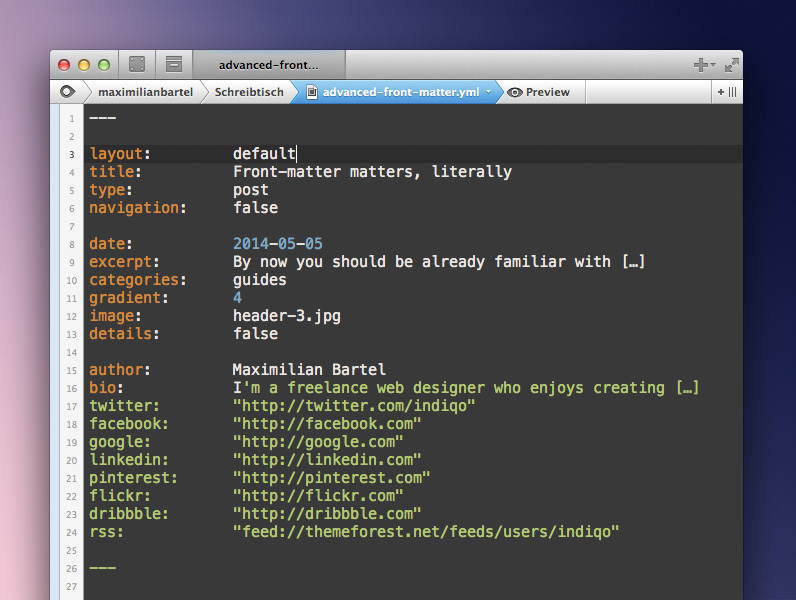
Advanced front-matter
This is the front-matter of the page you're currently viewing
Below you’ll see a detailed description of each of these options, what they do and how you can use them in order to control many aspects of the page easily — I’ll skip layout, title and type though.
- navigation: Can be either
trueorfalseand controls wether the post or page appears in the navigation or not. This just works iftypeis either set topostorpage. - date: It’s a good practice to set the date within each file as well even though it’s not required. The order of all posts and pages added to the navigation depends on their date too.
- excerpt: A quick summary which shows up on top of each page as well as on the homepage listing.
- categories: Add one or more
categoriesfor each page or post — they’re part of the excerpt and influence the way Jekyll builds the sites hierarchy. - gradient: Specify a number between 1 and 5 to define the color of the gradient applied to the header of the post or page.
- image: Add an image to the
imagesfolder and add its file name here so it shows up on top of the page. The perfect size would be 1200 x 700px but everything should work just fine considering that it will be scaled accordingly anyway. - details: Can be either
trueorfalseand specifies wether the header image selected for this page will show up in the homepage listing as well. - author: Feel free to add the name of the posts or pages author.
- bio: A short description or bio can be appended too.
The remaining front-matter should be self-explanatory in my opinion and you’re able to attach various social media profile links to the authors profile.
Please keep in mind though that links usually include colons and these are reserved by YAML. That said, make sure that you wrap links (and literally anything else which might include colons) into quotes so they don’t break it.